CNFans group order guide: one account, individual choices, a shared parcel
A shared parcel starts with separate choices. One person may operate the agent account, but each item still needs an owner, an exact specification and a decision when something changes. Follow the documented buying sequence below, then use the freight splitter once you have a real total to divide. A group plan does not make stock, shipping savings or refunds certain.
01
Agree and fund the purchase
01
Collect a product link for every participant
Use a category or search to find a candidate, then open the actual seller listing. Record its URL beside the participant’s name and intended quantity. The historical tutorial starts by pasting a product link into CNFans search. A group chat photo or a shared shop homepage is not a complete instruction: it can leave the account holder guessing which listing or option someone meant.
Historical official tutorial: a product URL is pasted into the CNFans search field. The banners and storage claims visible in the old screen are not current policy. View full-size image
02
Confirm the exact choices before submitting
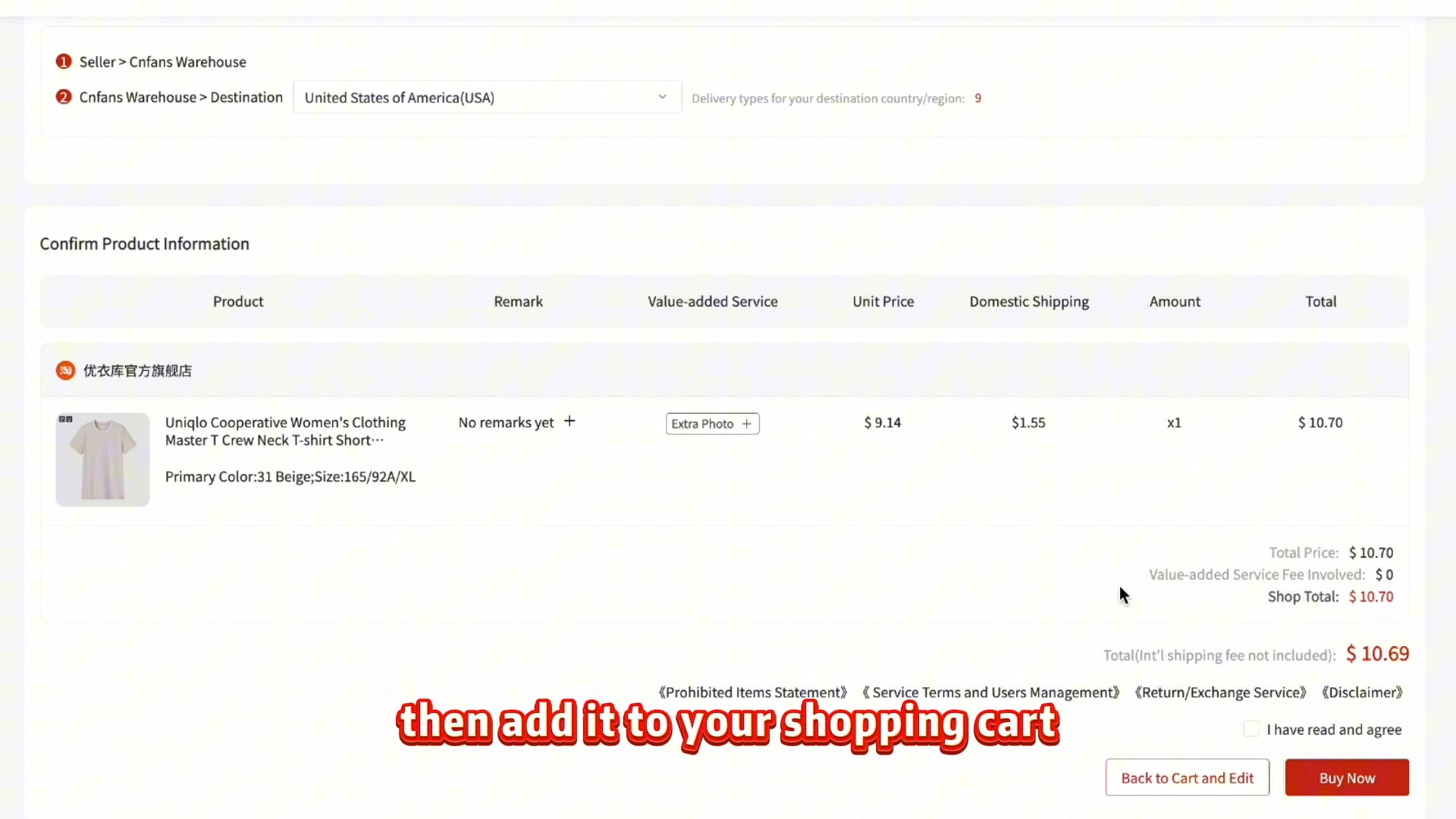
Ask each person to confirm size, color, model, package contents and quantity. Preserve the seller’s exact option wording where a translation loses detail. Compare the confirmation screen with that approved list before submitting. The screenshot below comes after variant selection; it is not the option picker itself. If two people want apparently identical items, retain their separate allocations so a later missing unit is traceable.
Historical review screen after variant selection. Check the selected product, quantity and domestic shipping here; the original option picker is not shown. View full-size image
03
Record the purchase payment without calling it the final total
The first payment is for the purchase request and domestic delivery, plus applicable charges shown in checkout. Record who advanced the money and what each participant has contributed, but keep international freight and possible destination costs open. A payment into the group fund is not a second agent order. Amounts and payment methods in the old screenshot are examples; use the current checkout terms if service becomes available.
Historical annotated payment example. The numbers 7–10 printed inside this picture belong to its original annotations, not the nine steps in this guide. Methods and amounts are examples. View full-size image
02
Purchase and warehouse decisions
04
Keep the account holder responsible for purchase decisions
The account holder needs to read acceptance, purchase status and messages about stock or price. A paid request can still need action before the seller is bought from. Agree in advance whether a substitute is allowed and who approves a higher price; do not decide silently for another participant. The Orders example shows pending and cancelled rows, not confirmation that all the group’s goods were purchased.
Historical Orders screen. Payment Pending and Cancelled examples are visible; this picture does not confirm a completed purchase. View full-size image
05
Track the seller deliveries item by item
Different sellers send separate domestic parcels. Track every product line to warehouse receipt instead of treating one delivered package as the whole group arriving. Warehouse processing can follow the courier’s delivery scan. If one item is delayed, compare the situation with the storage information for items already received and ask the affected person whether waiting still makes sense. Do not promise a departure date from a seller estimate.
06
Get each owner’s decision on the warehouse evidence
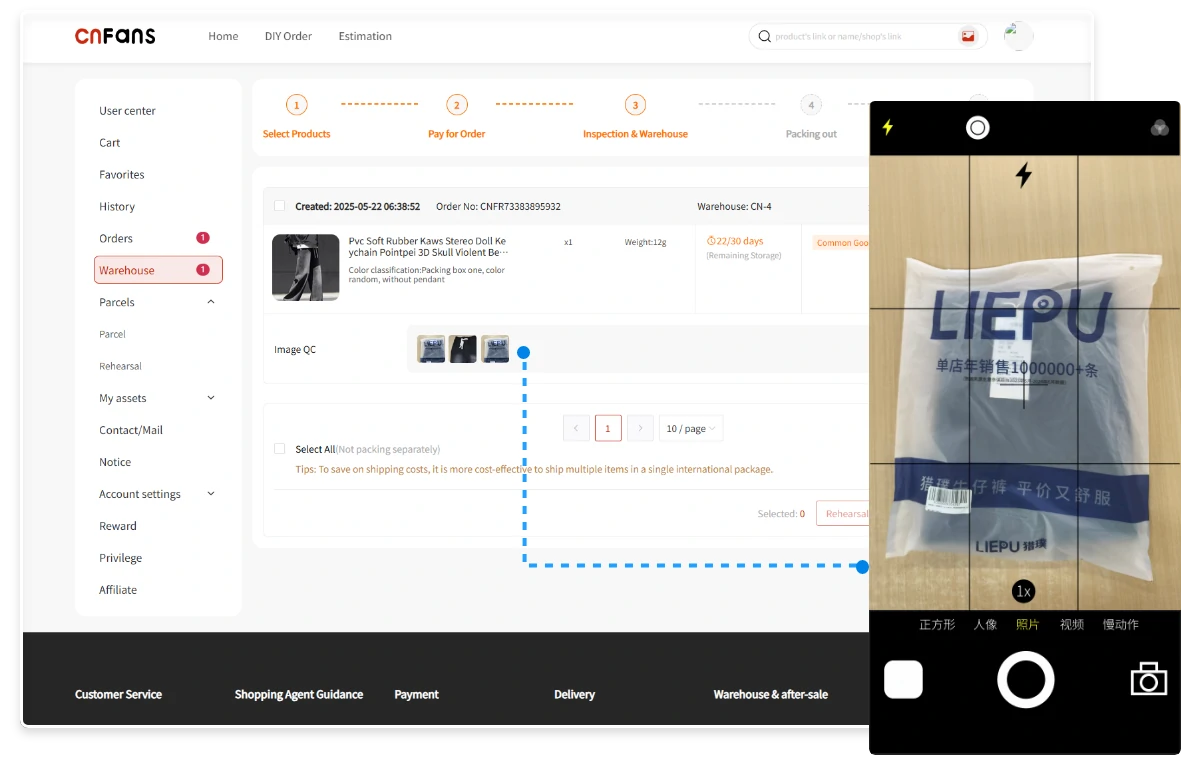
Check received quantity, size label, variant and visible condition against the approved list. Share the relevant item’s evidence with its owner and set a clear response deadline within the actual order’s available window. Ask for a specific additional view or measurement when needed. A QC picture cannot prove authenticity or every hidden defect, and the interface example below is not evidence that its displayed item is correct.
Historical Warehouse/QC interface with example pictures. The interface locates the evidence; it does not establish that the pictured goods match an order. View full-size image
03
The shared international parcel
07
Agree the final contents of the shared parcel
Resolve any dispute and confirm the exact eligible items for the outbound parcel. Keep a changed or rejected item out until its owner has made a decision and the agent has confirmed the available options. Read storage and restriction warnings: the archived example includes Expired. Recount quantities when one person withdraws, because that change can affect both the parcel and the method used to allocate freight.
Historical Warehouse selection screen with an Expired example. Resolve storage and eligibility warnings before submitting an outbound request. View full-size image
08
Allocate the confirmed freight and pay for the shipment
Compare routes for the agreed contents and destination, including packing, chargeable weight and the full payable amount. Once a real freight total is known, use an agreed method such as measured item weight, item count or equal shares; each is an allocation choice, not the carrier’s own billing rule. Record rounding and any shared packaging cost. Pay the international shipment only after the group understands the actual quote.
Historical international-freight payment screen. Its amount and coupon controls do not establish a current quote or eligibility for any discount. View full-size image
09
Receive, count and hand over everyone’s items
The receiver should follow dispatch and tracking, then photograph the parcel before opening it. Count goods against the agreed manifest and record visible damage or missing items before handing things out. Keep each participant’s allocation identifiable, especially identical products. Settle remaining balances from actual charges and documented refunds. If the account holder must raise a case, provide the item and parcel references rather than a group-chat summary.
The historical official walkthrough
The recording shows an older interface. Prices, promotions, payment options and storage wording in the video are not current terms.
The cost ledger records what was charged for goods, domestic delivery, optional services, international freight and applicable destination expenses. The contribution ledger records who paid money into the group and who advanced a charge. Mixing them can make a participant appear settled before freight exists. Keep currencies and conversion charges visible, and record a refund only when its amount and destination are confirmed.
QC approval belongs to the right item
Give the participant the relevant warehouse item reference and pictures, together with the approved option. A message saying “looks fine” without identifying the piece is poor evidence when a group bought several similar units. If a view is missing, request that view and check any fee first. Return eligibility and deadlines belong to the actual order; a group preference cannot extend them.
Choose the split before there is a disagreement
Weight, item count and equal shares answer different questions. A bulky light item may increase parcel dimensions while contributing little scale weight. A route’s chargeable-weight formula can therefore differ from the fairness rule chosen by the group. Explain the compromise, agree treatment of packaging and rounding, and use the tool only with a known total. Combining items does not guarantee lower freight.
One account does not mean shared credentials
The account holder should handle order messages and keep the group informed without sharing passwords or payment details. The receiver needs the manifest and relevant tracking, not access to everyone’s financial information. For an order problem, the current public CNFans maintenance notice directs queries to [email protected]. This independent guide cannot access the account, hold group funds or resolve a claim.
Before the group starts
Can the freight splitter calculate a shipping quote?
No. It divides a total you provide according to a chosen rule. The route, parcel and packing determine the actual quote offered by the agent.
Does paying my friend mean CNFans has bought my item?
No. Your contribution and the agent purchase are separate records. The account holder must check the actual order status and any requests for action.
Should every item have the same freight share?
Only if the group agrees. Equal shares, counts and weights distribute cost differently. Choose a method with the actual contents and quote in mind.
Is checkout available during the maintenance notice?
This page documents the historical process. On 21 October 2026 the official site showed maintenance with no reopening date; this guide does not establish that a purchase can currently be made.
What Chip-In helps you decide
Chip-In makes a group order easier to reconcile. The freight tool compares allocation methods using the total you enter; the deeper pages explain who holds the account, who receives the parcel and how to handle a sold-out or missing item. Use those decisions alongside the buying guide, before the group commits money.
A Spreadsheet helps friends find products; it does not collect their money or operate the agent account. CNFans’ historical process joined purchases from sellers to warehouse handling and an international parcel. In a group, keep each item’s owner and specification visible even when one person coordinates the account.
Item ledger
Money ledger
Owner, original product link, option and count
Contribution received, date and purpose.
Purchase, domestic delivery and QC state
Actual item charge and any domestic delivery allocation.
Owner’s reply to a mismatch or photo question
Approved adjustment, refund credit and withdrawal state.
Parcel inclusion and handover count
Freight rule, quoted total, final allocation and settlement.
Use initials in shared worksheets and keep addresses, banking records and account credentials private. Choose a coordinator and a backup contact for communication, without assuming the service permits credential sharing or restricts every support interaction to one person.
A contribution is not proof of a purchase
If the bank shows a debit but the agent does not show a matched payment, collect the reference, currency, amount and time before paying again. Keep goods, domestic delivery and disclosed service or funding fees apart from later packing and freight. Conversion costs belong to the amount actually charged, not a rough catalog display.
For a sold-out item, record whether the purchase occurred and what cancellation or return process applies. If money is credited to the platform, the group still needs to record any withdrawal and payment back to its owner. Do not distribute a projected refund as if it has already arrived.
Give each owner a specific question to answer
Forward the relevant item reference and photos without exposing unrelated orders. Ask the owner to compare size, quantity, accessories and disclosed condition with the saved option. An unreadable tag needs a clearer view; a fit concern needs a defined measurement. Verify availability and charges for extra evidence rather than assuming it is included.
GL/RL is informal community language. Keep an explicit reply identifying the item and concern, but do not treat that reply as a legal waiver or an agent decision. Check return and storage deadlines independently, and agree what to do if an owner does not respond before the group’s planned dispatch.
Allocate a confirmed quote, then keep the final bill
The freight splitter divides a number you enter. It cannot estimate a route, verify weight or decide what is fair. Agree whether item count, weight or equal shares fits the contents, and how packing, rounding and later adjustments will be handled. Record the actual packed dimensions and the route’s billable-weight rule separately from that fairness choice.
Check destination, restrictions, coverage and applicable destination charges before the freight payment. Keep the final item list for unpacking and handover. A created tracking number is not yet carrier collection; a delivered box still needs its contents counted.
Choose trust you can inspect
Chip-In helps a known group agree roles and reconcile costs. It does not hold funds, guarantee a participant or authenticate a seller. For any Spreadsheet, check original links, update dates and commercial disclosure; for a seller, ask for a precise option and clear condition information.
Compare current agent access, supported goods, costs, warehouse terms, parcel routes and problem-handling channels. CNFans’ archived workflow is not proof of current availability or a group discount. Superbuy, CSSBuy and other agents need the same checks for the proposed parcel rather than a ranking drawn from comments.
Use verified official notices for current contact details. The linked Reddit reports were reviewed on 22 October 2026 as individual, unauthenticated accounts; no verified Discord commentary is used. A community member claiming staff status does not establish authority to receive payment or credentials. Set account responsibilities and prepare the evidence route before collecting contributions.